
The Creative Commons Catalog API ('cccatalog-api') is a system that allows programmatic access to public domain digital media. It is our ambition to index and catalog billions of Creative Commons works, including articles, songs, videos, photographs, paintings, and more. Using this API, developers will be able to access the digital commons in their own applications.
As of June 2018, this project is in its early stages. For now, assume that the API is unstable and that the REST interface could change dramatically over short periods of time. We have not yet made the production system publicly accessible.
This repository is primarily concerned with back end infrastructure like datastores, servers, and APIs. The pipeline that feeds data into this system can be found in the cccatalog repository.
Beta browsable API documentation can be found here.
Ensure that you have installed Docker and that the Docker daemon is running.
git clone https://github.com/creativecommons/cccatalog-api.git
cd cccatalog-api
docker-compose up
After executing this, you will be running:
- A Django API server
- PostgreSQL, the source-of-truth database
- Elasticsearch
es-syncer, a daemon that indexes documents to Elasticsearch in real-time.
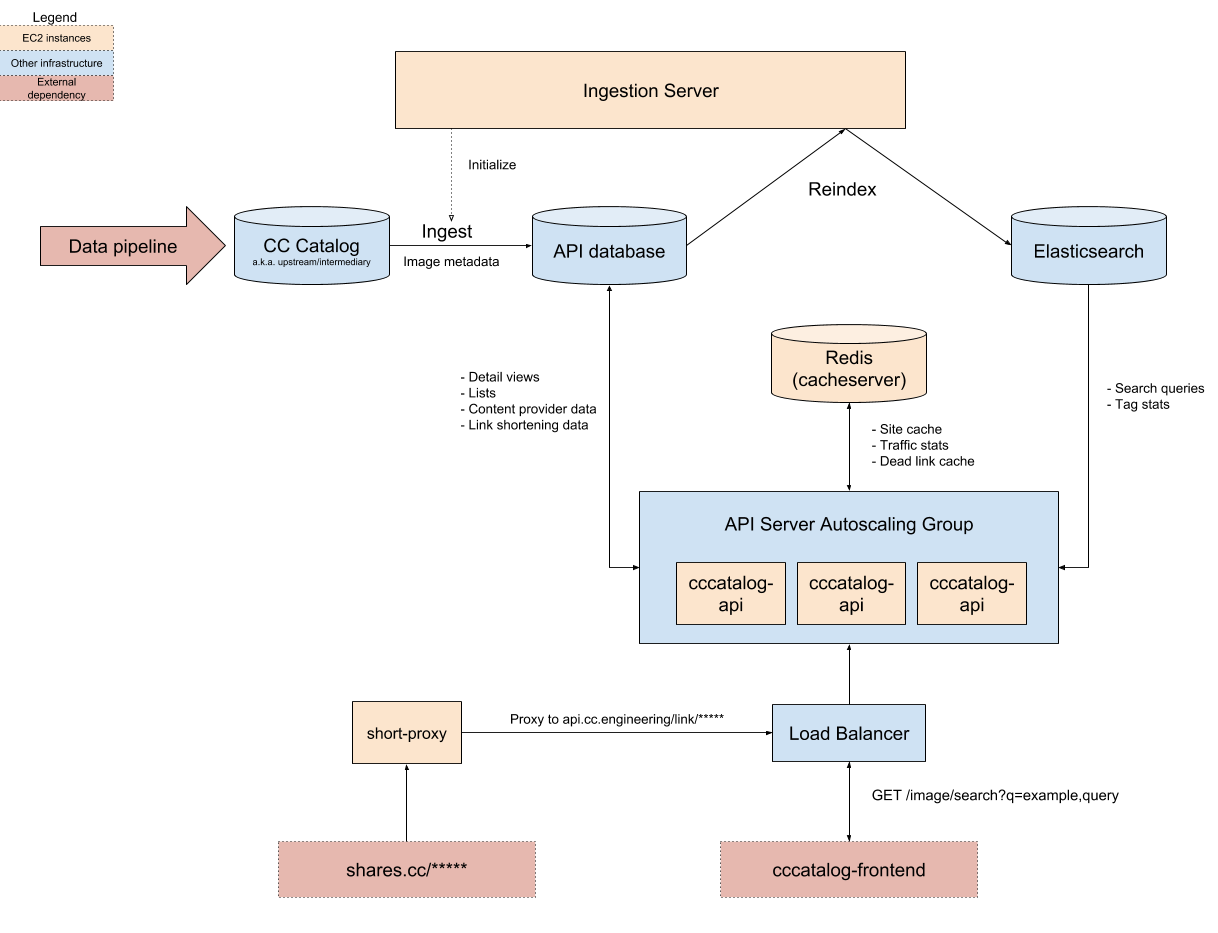
Coming soon.
All deployment and configuration management is handled by Terraform, a declarative infrastructure-as-code tool. This allows fully automated and reproducible zero-downtime deployment to AWS. In addition to deployment automation capabilities, Terraform serves as a low-level documentation layer for how the system is implemented and configured. Although this guide only describes deploying to the staging environment, the same process can be applied to production.
By the end of this guide, you will understand how to quickly deploy the application via Terraform, but further customizing the configuration will require some additional reading. Start with the official documentation. You should also consider reading the excellent Terraform: Up and Running book by Yevgeniy Brikman, with which you can master Terraform in an afternoon.
Download and install Terraform.
Because we use a fully open development process, secrets (AWS keys, passwords) are stored externally. Aquire cccatalog-api-secrets.tfvars from a Creative Commons engineer. Store this somewhere safe and outside of the repository directory. For instance, you could store the keys in ~/secrets/ccccatalog-api-secrets.tfvars.
Lastly, set up your AWS keys.
export AWS_ACCESS_KEY_ID="XXXXXXXXXXXXXXX"
export AWS_SECRET_ACCESS_KEY="XXXXXXXXXXXXXXXXXXXXXXXXXXXXXXX"
Update the ccccatalog-configuration with the git revision you would like to deploy.
cd deployment/environments/dev/services/cccatalog-api
#  Change Git revision number with your desired commit on the Master branch.
vim main.tf
From the same directory, create a deployment plan.
terraform plan -var-file=/path/to/your/secrets/file.tfvars -out=/tmp/cccapi-plan.out
Read the planned changes carefully. If everything is in order, run the following to perform the deployment:
terraform apply /tmp/cccapi-plan.out
This will result in a zero-downtime deployment of the API server. If the deployment fails, don't panic: the old version of the system will work exactly as before. The newly deployed servers will not be registered with the load balancer until they pass a healthcheck. You can reconfigure and redeploy as often as you need.
The process of deploying Elasticsearch syncer is similar to deploying the API server, with the exception that the Docker tag should be updated instead of the git commit. Unlike the API server, the syncer does not use "zero downtime" style deployment, but the site will continue to function if the syncer is down, albeit with temporarily stale Elasticsearch data.
See es-syncer/README.md for additional commentary on operating the Elasticsearch Syncer in production.
cd deployment/environments/dev/services/es-syncer
# Update docker tag
vim main.tf
# Plan the deployment
terraform plan -var-file=/path/to/your/secrets/file.tfvars -out=/tmp/essyncer-plan.out
# Perform the deployment
terraform apply /tmp/essyncer-plan.out
Coming soon.